
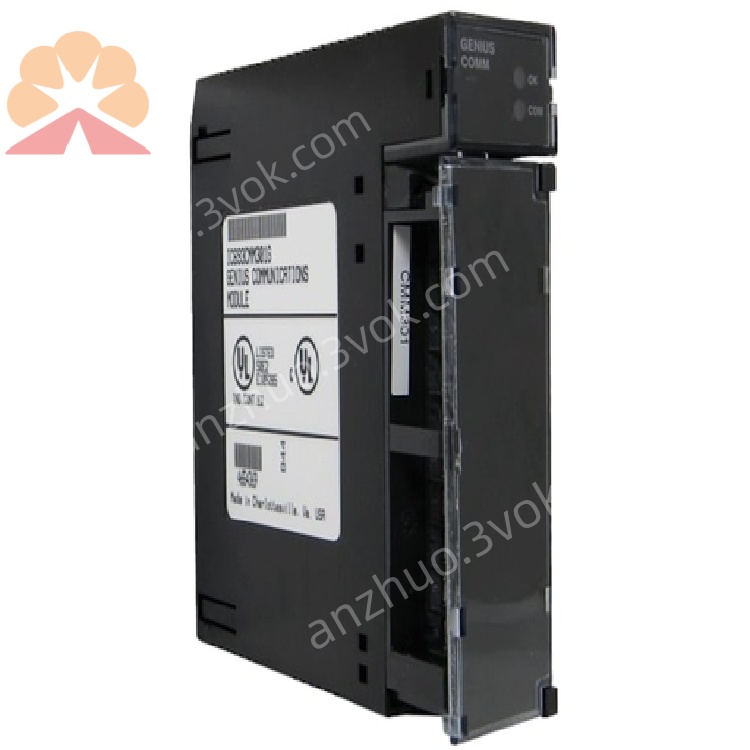
IC693CMM301
Description
1. Product Overview

Key Features
Genius Bus Communication: Noise-immune network for fast, reliable real-time control data transmission.
Global Data Exchange: Up to 256 bits (32 bytes) of configurable global data (32-bit increments).
Multi-Device Support: Connects to up to 7 additional Genius devices (Series 90-30/90-70 PLCs, HHP, or PCs).
Dual Status LEDs: OK (module health) and COM (bus activity) for instant diagnostics.
No Jumpers/DIP Switches: Software-configurable via handheld programmer or Logicmaster 90 software.
Industrial Hardening: Designed for high electrical noise and vibration environments.
2. Technical Specifications
2.1 General
| Parameter | Specification |
|---|---|
| Manufacturer | GE Fanuc (Emerson) |
| Series | Series 90-30 PLC |
| Model | IC693CMM301 |
| Type | Genius Communications Module (GCM) |
| Global Data Capacity | 256 bits (32 bytes), configurable in 32-bit increments |
| Max Genius Devices | 8 total (1 local + 7 remote) |
| Power Consumption | ≤ 5 W (from backplane) |
| Dimensions (W×H×D) | 4.33 × 2.76 × 1.38 in (110 × 70 × 35 mm) |
| Weight | Approx. 0.66 lbs (0.3 kg) |
2.2 Environmental
| Parameter | Specification |
|---|---|
| Operating Temperature | 0°C to +60°C (32°F to 140°F) |
| Storage Temperature | -25°C to +70°C (-13°F to 158°F) |
| Relative Humidity | 5% to 95% (non-condensing) |
| Vibration | 0.2 in displacement (5–10 Hz); 1 G (10–200 Hz) |
| Shock | 5 G (10 ms duration) |
| Protection Class | IP20 (front panel) |
2.3 Compatibility
| Compatible Items | Details |
|---|---|
| PLC Host | Series 90-30 CPU331 or higher |
| Genius Devices | Series 90-30/90-70 PLCs, Genius I/O modules, HHP, PCs (with PCIM card) |
| Configuration Tools | Handheld Programmer (HHP), Logicmaster 90, or Machine Edition software |
3. Functional Description
3.1 Genius Bus & Global Data
3.2 Data Exchange Modes
Producer Mode: Sends local PLC data (%G memory) to the Genius bus.
Consumer Mode: Receives data from other Genius devices into the local PLC’s %G memory.
Mixed Mode: Simultaneously produces and consumes data (most common).
3.3 Bus Topology
Multidrop: Linear or star topology (up to 8 devices).
Cable: Shielded twisted pair (Genius bus cable).
Max Distance: 500 m (1,640 ft) at 153.6 kbps; longer distances with repeaters.
4. Installation & Wiring
4.1 Module Installation
Power Off: Shut down the PLC system and disconnect all power sources.
Baseplate Slot: Insert the IC693CMM301 into any available I/O slot (Slots 2–9) on a Series 90-30 baseplate (e.g., IC693CHS391).
Secure: Tighten the front-panel screws to ensure firm backplane contact.
Power On: Restore system power; check that the OK LED lights steadily (green).
4.2 Genius Bus Wiring
Connector: Use the front-panel Genius bus port (DB9 or terminal block, per revision).
Cable: Connect shielded twisted-pair cable to the bus port; ground the shield at one end only.
Termination: Add 120 Ω termination resistors at the two physical ends of the bus (critical for signal integrity).
Device Addressing: Assign unique Genius addresses (1–8) to each device via software configuration.
5. Configuration
5.1 Software Requirements
Logicmaster 90 (legacy) or PACSystems Machine Edition (modern).
Handheld Programmer (HHP) (portable configuration option).
5.2 Configuration Steps
Add Module: In the software project, insert the IC693CMM301 into the correct baseplate slot.
Set Bus Parameters:
Baud Rate: 153.6 kbps (default), 76.8 kbps, or 38.4 kbps.
Module Address: Unique Genius address (1–8).
Global Data Size: Allocate 32–256 bits (32-bit increments) to %G memory.
Map Data: Define which local %G addresses to produce (send) and which remote addresses to consume (receive).
Download: Transfer the configuration to the PLC; the module initializes and joins the Genius bus.
6. LED Indicators
| LED | Color | Status | Description |
|---|---|---|---|
| OK | Green | Steady On | Module powered, self-test passed, operational |
| OK | Green | Blinking | Self-test in progress or minor fault |
| OK | Off | — | No power or critical module failure |
| COM | Yellow/Green | Steady On | Genius bus active, no errors |
| COM | Yellow/Green | Blinking | Bus communication errors (e.g., noise, collision) |
| COM | Off | — | No bus activity or bus disconnected |
7. Maintenance & Troubleshooting
7.1 Routine Maintenance
Visual Inspection: Check for loose cables, damaged connectors, or bent module pins.
LED Check: Verify OK (steady green) and COM (steady yellow/green) during normal operation.
Cleaning: Blow compressed air through ventilation slots to remove dust (power off first).
Configuration Backup: Regularly save and back up module configuration files.
7.2 Common Issues & Solutions
| Symptom | Possible Cause | Solution |
|---|---|---|
| OK LED Off | No backplane power or module failure | Check PLC power supply; reinsert module; replace if faulty |
| COM LED Blinking | Bus noise, incorrect termination, or address conflict | Check cable shielding; verify termination resistors; confirm unique device addresses |
| No Global Data Exchange | Incorrect data mapping or bus baud rate mismatch | Review software configuration; ensure all devices use the same baud rate |
| Module Not Recognized | Poor backplane contact or incompatible CPU | Reinsert module; verify CPU is model 331 or higher |
8. Ordering Information
Model: IC693CMM301
Description: Series 90-30 Genius Communications Module (GCM)
Accessories:
IC693CBL310: Genius bus cable (3 m)
IC693CBL311: Genius bus cable (10 m)
IC693ACC310: 120 Ω termination resistor kit
9. Compliance & Certifications
CE: Compliant with EU EMC and LVD Directives.
UL: UL 508 Listed for Industrial Control Equipment.
RoHS: Compliant with Restriction of Hazardous Substances.
IEC: Compliant with IEC 61131-2 (Programmable Controllers).
Get a Quote