
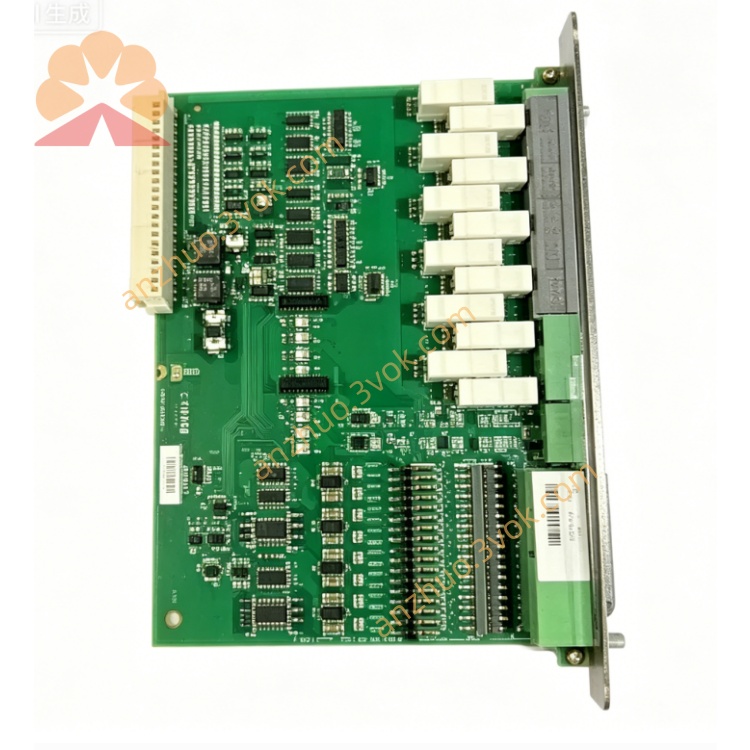
Description
1. Product Overview

2. Key Features
40‑Channel Multi‑I/O: Comprehensive mix of analogue/digital inputs and outputs.
Configurable Inputs: DIP‑switch selectable binary, voltage (0–10 V), or current (4–20 mA) per channel.
Galvanic Isolation: 2.5 kV isolation between field side and system bus for noise immunityDEIF.
Hot‑Swappable: Module replacement without system shutdown (DM‑4 rack compatible).
Rotary Address Switch: Easy I/O station addressing (0–15) for system recognition.
LED Status Indicators: Power, communication, and channel activity LEDs for diagnostics.
DIN‑Rack Mount: Standard 19” rack form factor (6HE, double euro) for DM‑4 cabinetsDEIF.
Wide Operating Range: Robust performance in industrial temperature and voltage conditionsDEIF.
3. Technical Specifications
3.1 Electrical Ratings
| Parameter | Specification |
|---|---|
| Model | IOM4.1 |
| System Compatibility | Delomatic 4 (DM‑4 Land/Marine) |
| Input Channels | |
| – Analogue Inputs (AI) | 16 × configurable (0–10 V / 4–20 mA / binary) |
| – Digital Inputs (DI) | 16 × binary (24 VDC logic, sink/source) |
| – Frequency Inputs | 2 × pulse/frequency (0–10 kHz, 24 VDC) |
| Output Channels | |
| – Analogue Outputs (AO) | 4 × 0–10 V / 4–20 mA (configurable) |
| – Digital Outputs (DO) | 2 × relay (250 VAC / 8 A) + 2 × transistor (24 VDC / 1 A) |
| Control Supply | 24 VDC ±20% (18–32 VDC); ≤15 W |
| Isolation | 2.5 kV AC (1 min) between field and system busDEIF |
| Resolution (Analogue) | 12‑bit (AI/AO) |
| Accuracy (Analogue) | ±0.1% FS (25°C) |
3.2 Environmental & Mechanical
| Parameter | Specification |
|---|---|
| Operating Temperature | -20°C to +70°C |
| Storage Temperature | -30°C to +80°C |
| Humidity | 95% RH non‑condensing |
| Vibration | 2–13.2 Hz: ±1 mm; 13.2–100 Hz: ±0.7 g |
| Enclosure | IP20 (front), IP00 (rear) |
| Dimensions (W×H×D) | 240 × 160 × 50 mm (6HE, double euro)DEIF |
| Weight | Approx. 1.2 kg |
| Mounting | 19” DIN rack (DM‑4 standard cabinet)DEIF |
4. Application Scope
Power Generation Control: Generator monitoring/control (voltage, frequency, temperature, fuel flow).
Marine Power Systems: Shipboard genset automation, switchboard control, and alarm monitoring.
CHP & Cogeneration: Combined heat/power plant I/O interfacing (sensors, valves, governors).
Industrial Automation: Factory process control, motor control, and analogue/digital signal conditioning.
Remote Monitoring: Data acquisition for SCADA and telemetry systems.
5. Installation & Wiring
5.1 Installation Requirements
Mounting: Install in a DM‑4 19” rack (vertical orientation); ensure ≥50 mm clearance for ventilationDEIF.
Environment: Avoid direct sunlight, moisture, corrosive gases, and excessive vibration.
ESD Protection: Use an anti‑static wristband when handling the module (static-sensitive components).
5.2 Module Addressing
Rotary Switch: Set the I/O station address (0–15) using the front‑panel rotary switch; match the address in the DM‑4 system configuration.
5.3 Terminal Wiring (Simplified)
| Terminal Group | Description | Wire Gauge |
|---|---|---|
| Power | ||
| 1–2 | 24 VDC Power (+/−) | 1.5 mm² |
| 3 | Chassis Ground (Earth) | 2.5 mm² |
| Analogue Inputs (AI1–AI16) | ||
| 4–19 | AI Channels (0–10 V / 4–20 mA / binary) | 1.0 mm² |
| Digital Inputs (DI1–DI16) | ||
| 20–35 | DI Channels (24 VDC) | 1.0 mm² |
| Analogue Outputs (AO1–AO4) | ||
| 36–39 | AO Channels (0–10 V / 4–20 mA) | 1.5 mm² |
| Digital Outputs (DO1–DO4) | ||
| 40–41 | Relay DO1 (NO/COM) | 2.5 mm² |
| 42–43 | Relay DO2 (NO/COM) | 2.5 mm² |
| 44–45 | Transistor DO3/DO4 (+/−) | 1.5 mm² |
AI Configuration: Set DIP switches for each AI channel to voltage (V), current (I), or binary (B) (refer to PCB silkscreen).
Shielded Cables: Use twisted‑pair shielded cables for analogue signals; ground shields at one end only.
Terminal Torque: Tighten terminals to 0.8–1.0 Nm to avoid loose connections.
6. Front Panel & Operation
6.1 Front Panel Layout
LED Indicators
POWER: On when 24 VDC supply is present.
COM: Flashes during active communication with the DM‑4 main controller (PCM4.x).
STATUS: On solid if no faults; flashes for module/channel errors.
Rotary Address Switch: Sets I/O station address (0–15).
DIP Switches (PCB): Configures AI channel signal types (V/I/B).
6.2 Startup & Configuration
Power On: Apply 24 VDC; POWER LED lights.
Address Setting: Verify rotary switch address matches system configuration.
AI Configuration: Set DIP switches for each AI channel (voltage/current/binary).
System Recognition: The DM‑4 PCM detects the IOM4.1; COM LED flashes during handshake.
Parameter Setup: Use DEIF Utility Software to configure channel ranges, scaling, and fault thresholds.
Operation: STATUS LED solid = normal operation; inputs/outputs active per system logic.
7. Safety Precautions
High Voltage Hazard: Only qualified electricians may install/service; disconnect all power before wiring.
ESD Risk: Static electricity can damage the PCB; use anti‑static protection when handling.
Hot‑Swap Caution: Ensure the DM‑4 system is in switchboard control before replacing the module.
No Unauthorised Modification: Do not open the enclosure; tampering voids the warranty.
Environmental Limits: Do not operate outside -20°C to +70°C; avoid condensation.
8. Maintenance & Storage
8.1 Regular Maintenance (Every 6 Months)
Visual Inspection: Check for loose terminals, damaged wiring, or corrosion.
Cleaning: Wipe the front panel with a dry cloth; do not use liquid cleaners.
LED Check: Verify POWER, COM, and STATUS LEDs operate correctly.
Channel Test: Use DEIF Utility Software to test AI/AO/DI/DO accuracy and functionality.
Cable Tightness: Re‑tighten terminals to 0.8–1.0 Nm.
8.2 Storage Guidelines
Condition: Store in original anti‑static packaging at 10–30°C, 30–70% RH.
Environment: Keep dry; avoid direct sunlight and extreme temperatures.
Duration: Shelf life ≤2 years; inspect for ESD damage before use if stored longer.
9. Troubleshooting
| Fault Phenomenon | Possible Cause | Solution |
|---|---|---|
| POWER LED Off | No 24 VDC supply / blown fuse | Check power wiring; replace 3 A fuse |
| COM LED Not Flashing | Incorrect address / PCM communication fault | Verify rotary switch address; check ARC‑Net cable |
| STATUS LED Flashing | AI/DI/AO/DO fault / overvoltage | Check wiring; verify DIP switch settings |
| Analogue Input Inaccurate | DIP switch mismatch / noisy signal | Correct DIP switches; use shielded cables |
| Digital Output Not Activating | Overload / wiring fault | Check load; verify DO terminal connections |
10. Warranty & Disclaimer
Model: IOM4.1 Combined Input/Output Module.
Warranty Period: 24 months from delivery date under normal installation and use.
Warranty Exclusions: Damage from misuse, overvoltage, lightning, water ingress, or unauthorised modification.
Specifications Subject to Change: Manufacturer reserves the right to update specifications without prior notice.
Liability Limitation: Manufacturer is not liable for indirect or consequential damages.
Documentation Version: 1.0 (2026); latest manual available at www.deif.com.
Get a Quote